Case study · Live · Work in progress
Forge AI Solution Navigator
A workspace for the product manager taking an AI solution from idea to production. It shows where each initiative stands, what has to happen next, who owns it, what proof is missing, and whether it’s actually ready to move forward.
In 30 seconds
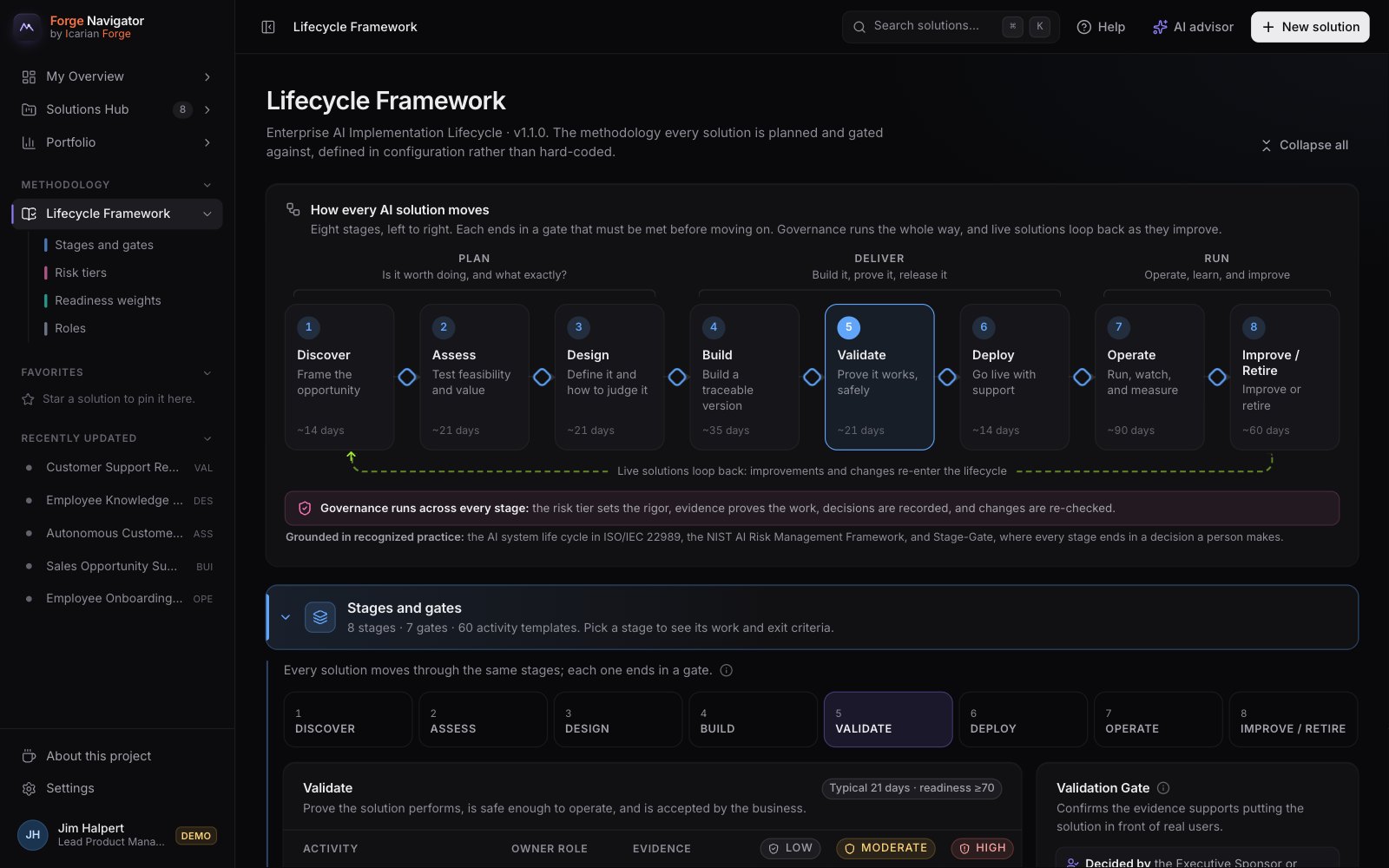
Wrote the methodology first: eight stages, risk tiers and gate rules. Then built the product around it.
Directed Claude Code as the engineering team, set the rules up front, and made every product call, including when to stop and check.
Ran the full demo at every phase and shaped the AI’s limits: what it may recommend, and what it must never decide.
AI stalls between the demo and production
The hard part of putting AI into a business isn’t the model. It’s everything around it: data checks, security and privacy reviews, evaluation, human oversight, user testing, support, training, and the sign-offs that tie them together. One product manager is accountable for whether it’s ready, while the work is spread across a dozen teams.
Ticket tools track tasks. Governance tools track compliance. Neither answers what the PM actually carries: where is this, what’s next, who owns it, what proof is missing, and are we really ready? So I built the cockpit I’d want for that job, filled with eight realistic enterprise AI projects at a fictional company.
It’s also the same territory as my day job: guiding generative AI from evaluation through rollout, and owning launch readiness, with the final go/no-go call, across a portfolio of 25+ products.
Where it stands, what’s next, and who owns it
- Next best actionEvery solution opens on its single most important next step, with the owner and the reason.
- Gates that explain themselvesIf a stage can’t advance, it lists what’s blocking, who owns it, and how to fix it.
- Readiness that shows its mathA weighted score across seven dimensions. Work without approved evidence earns only partial credit.
- An AI advisor on every areaA star on any area asks what to do next and why. It recommends and explains, never approves, and runs free by default, with Claude as an option.
- Plans shaped by riskRaise the risk tier and the plan grows: a high-risk solution picks up 20 extra controls.
- Made personalMy Overview greets you by name with what you own and what’s waiting on you. Star favorites to keep them close, and Help finds answers even through typos.
One methodology, five steps
- PlanOne methodology file sets every plan. Change the file and the whole product follows.
- AssignEach activity gets a named owner, helpers, a due date and a plain-English reason it matters.
- ProveWork counts in full only when its evidence is approved: the review, the sign-off, the test report.
- GateEach stage ends in a gate, and a person records every gate decision.
- ReportLeaders see portfolio health, bottlenecks, risk, value and adoption, calculated live.
Rules I set before building anything
- Guided, not bureaucratic
- Higher risk, more rigor
- Evidence over checkboxes
- Never block without a reason
- Prove it without AI first
- Foundation
- Workflow
- Reporting
- AI advisor
- Polish
- Simplify
- Personalize
Seven phases, each proven before the next
Every phase ended with the demo run end to end in a real browser, before any AI went in and after. The latest pass made it personal: My Overview greets each person by name, favorites sit in a sidebar that folds open and shut, and the framework page opens on a map of the whole method. The pass before made it simpler to learn, with a Help center and a guided tour.
Where it could go from here
Development is ongoing.
- Connect the systems of recordPull work from Jira or ServiceNow instead of entering it twice.
- Teams, not one demo userShared data, roles and permissions in place of a private demo in each browser.
- Hold the advisor to a standardMeasure its recommendations against what experienced PMs would do before trusting it with more.